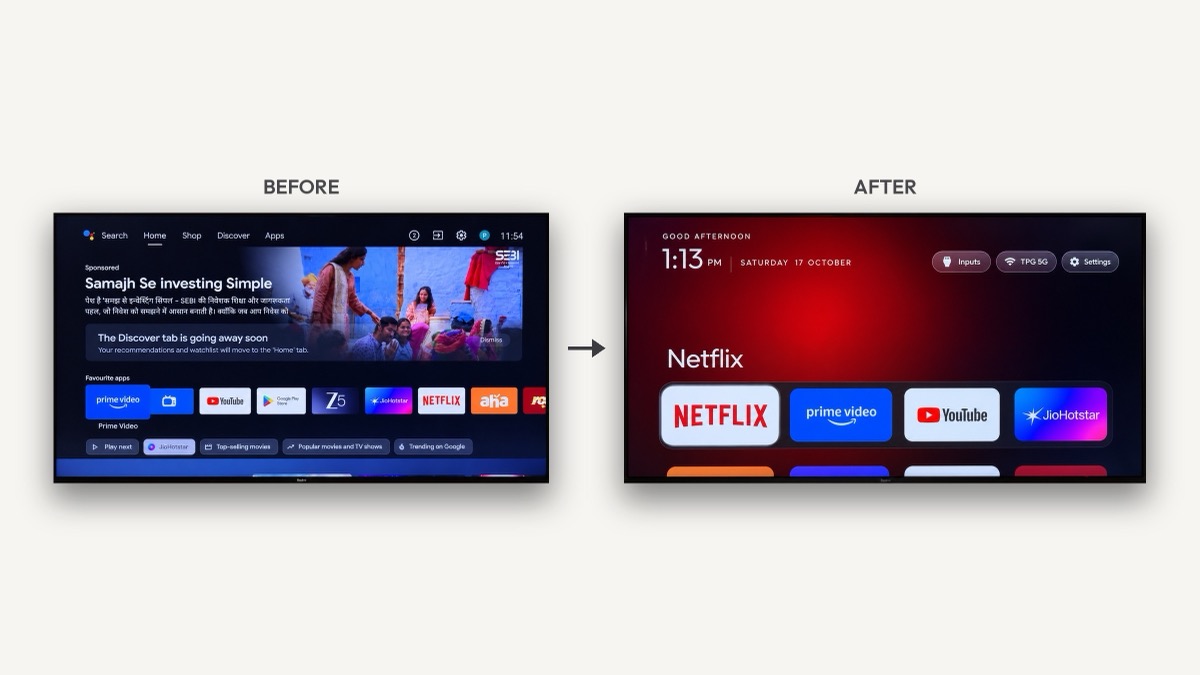
What is cleanyourtv?
cleanyourtv is an open-source toolkit and prompt that turns a cluttered smart screen back into a calm one for the apps you actually use. Android TV and Google TV sets from TCL, Xiaomi, Sony, Hisense, Philips and dozens of other brands ship with telemetry, "Discover" nags, sponsored content rows and preloaded apps that slow cheap hardware down. It disables that layer and installs a tiny native home screen instead.
The cleanyourtv project started on 17 October 2026, when developer Gathin T. posted that his parents' Xiaomi set showed a sponsored ad before you could even reach Netflix. He gave Claude Code the model number; it found the set on Wi-Fi, disabled 25 Xiaomi packages and wrote a new launcher. The replies filled up with other TV owners, their lists became the examples/ folder, and within days the repository passed thousands of stars and was covered by TechCrunch, Mashable and It's FOSS. Until 19 October the cleanyourtv repo was called tv-vibehack, so you will still see that name in older posts.
This is an unofficial guide. CleanYourTV Guide is an independent site that explains the cleanyourtv project and indexes its debloat lists. Get the code only from the official cleanyourtv GitHub repository.
How cleanyourtv works
Android TVs have the same debug bridge (ADB) as Android phones. Once you allow your computer on the set, it uses standard Android tooling in three steps:
Step 1: Back up
cleanyourtv saves the list of installed packages, which component owns Home, and your animation settings before it changes anything.
Step 2: Disable the bloat
cleanyourtv turns off the manufacturer's telemetry, ad services, content rows and preloaded junk with pm disable-user. Nothing is uninstalled, so the restore script can undo every step.
Step 3: Install the clean launcher
It builds a small native launcher (com.gathin.tvhome, about 300 KB) and makes it the default Home, rolling back if Home does not land on it.
Because bloat differs by brand, the cleanyourtv prompt has your coding assistant discover packages on your own set and ask before touching anything you might use, such as the voice assistant, Chromecast or the update service.
cleanyourtv quick start
| Step | What to do |
|---|---|
| 1. On the television | Settings → Device Preferences → About → press OK on Build seven times → back → Developer options → turn on USB debugging, plus Network or ADB debugging if you see it. Keep it switched on. |
| 2. On your computer | Paste the cleanyourtv prompt into Claude Code (or Codex, Gemini CLI) and fill in your TV model. |
| 3. Follow along | Accept "Allow USB debugging?" on screen, then answer the checklist: which apps you use, which four go in the dock, and whether to keep the voice assistant, Chromecast and updates. |
With the cleanyourtv repository as context the whole run takes about fifteen minutes, and the assistant checks each step with screenshots pulled from the screen.
What you get with cleanyourtv
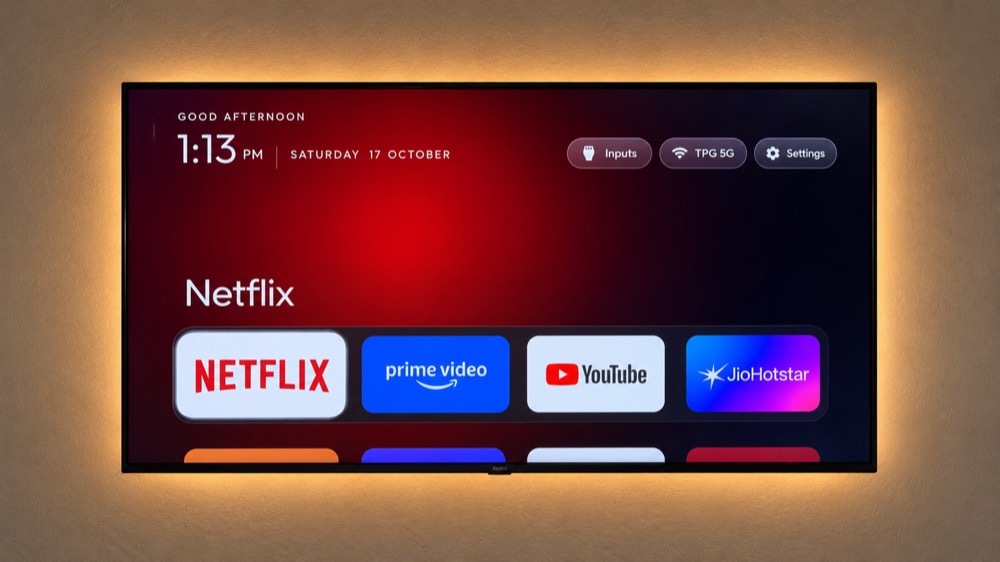
- A pitch-black home with a dock of your four favourite apps, where Apple TV puts it.
- A top shelf that names the focused app in large type over an ambient glow taken from its artwork.
- All other apps in a grid that slides up when you press Down, with one floating glass highlight.
- Three frosted buttons for Inputs (HDMI, AV, Live TV), network and Settings, plus a clock screensaver.
- Themes that change colours, wallpaper, dock and columns without a rebuild, and the launcher follows the system language in 15 languages.
Just as important is what disappears: no sponsored rows, no "Discover" nags, no analytics phoning home and no apps you never asked for. On 1 GB sets the launcher is built to stay light, with no blur, no video and no background services.
Which TVs does cleanyourtv support?
cleanyourtv works on anything running Android TV or Google TV. Fire TV gets the debloat half only. Samsung (Tizen) and LG (webOS) are different systems. A few China-market TCL sets refuse any third-party launcher. These brands have the most tested cleanyourtv lists:
| Brand | cleanyourtv lists |
|---|---|
| TCL | 16 |
| Xiaomi | 15 |
| Sony | 13 |
| Hisense | 4 |
| Philips | 4 |
| BenQ | 2 |
| CHiQ | 2 |
| Hitachi | 2 |
| Panasonic | 2 |
| Skyworth | 2 |
Model not listed? The cleanyourtv prompt discovers the bloat itself, and you can contribute your list back so the next owner of that model skips the discovery step. Browse all 80 cleanyourtv lists, or read the Google TV and Android TV guides.
Running cleanyourtv by hand
Everything the assistant does you can run yourself. The tools need only Python 3:
python3 -m venv tools/venv && tools/venv/bin/pip install -r tools/requirements.txt
export TV_HOST=192.168.1.50                              # the set's IP
tools/venv/bin/python -I tools/tv.py --probe             # model, Android version, firmware
tools/disable.sh examples/xiaomi-mi-tv-4a/debloat.txt    # apply a debloat list
tools/restore.sh examples/xiaomi-mi-tv-4a/debloat.txt    # undo it
TV_HOST=192.168.1.50 launcher/build-and-install.sh       # build the launcher, make it Home
Every script has a PowerShell twin for Windows. On macOS, its pure-Python ADB client avoids the "No route to host" error that Local Network privacy causes with the stock adb binary.
Is cleanyourtv safe?
cleanyourtv disables, it never deletes. Still, a few rules matter: never disable the Play Store, Play Services, the on-screen keyboard or the TV input services that play HDMI; disable the stock launcher only after the new one is running; and on Google TV watch the setup wizard, which can take over Home. Close network ADB when you are done, because port 5555 is plaintext on your LAN.
If anything goes wrong, the restore script puts everything back the way it was, and the built-in Settings → Apps page can re-enable packages too. Streaming apps keep updating through the Play Store, which it leaves alone.
cleanyourtv vs other ways to remove TV ads
Manual ADB debloat
Works, but you must research every package yourself. cleanyourtv gives you tested lists, a backup record and a restore script.
Just changing launchers
Hides the home screen but leaves telemetry and background services running. This project does both.
An external streaming box
Using the TV as a dumb display is clean but costs money. cleanyourtv is free and fixes the screen you already own.
DNS ad blocking
Blocking ad domains complements cleanyourtv for in-app ads. See remove ads from a smart TV.